












In traditional environments, access control typically stops at the server boundary. In the cloud, however, a single misconfigured role can open your entire environment to compromise. Attackers no longer need root on a box: they need a misassigned IAM policy.
Cloud IAM (Identity and Access Management) is the backbone of security in AWS, Azure, and GCP. Each platform uses slightly different terminology, but the principle is universal: grant only what’s required, and nothing more. This article will guide you through designing, implementing, and auditing least-privilege access models in the three major clouds.
AWS IAM: Policies, Roles, and Boundaries
Core concepts of AWS IAM:
- Users: Individual identities (humans or applications)
- Groups: Collections of users sharing permissions
- Roles: Identities assumed temporarily by AWS services or external entities
- Policies: JSON documents defining permissions
- Permission Boundaries: Limits what a user or role can be granted, even by other admins
Example of a minimal S3 access policy:
{"<a href="https://negativepid.blog/how-to-fix-common-kali-upgrade-errors/">Version</a>":"2012-10-17","Statement":[{"Sid":"AllowListAndReadSpecificBucket","Effect":"Allow","Action":["s3:GetObject","s3:ListBucket"],"Resource":["arn:aws:s3:::my-secure-bucket","arn:aws:s3:::my-secure-bucket\/*"]}]}
Practical steps:
- Use AWS managed policies as templates, not defaults.
- Define permission boundaries for delegated administrators.
- Enable IAM Access Analyzer to detect overly permissive policies.
- Rotate roles and access keys regularly; avoid static credentials.
- Pro tip: Use aws iam simulate-principal-policy to test a user’s or role’s effective permissions before deployment.
Azure: Role-Based Access Control (RBAC)
Core concepts of RBAC:
- Roles: Predefined or custom sets of permissions (e.g., Reader, Contributor).
- Assignments: Bind a role to a principal at a specific scope.
- Scopes: Hierarchical (Management Group → Subscription → Resource Group → Resource).
- Privileged Identity Management (PIM): Enables time-bound or approval-based elevated access.
Example of assigning a custom role via PowerShell:
					# Create custom role JSON
$role = @{
    Name = "Storage Reader"
    Description = "Can read <a href="https://negativepid.blog/gaia-x-the-european-cloud-ecosystem/">data</a> from storage accounts only"
    Actions = @("Microsoft.Storage/storageAccounts/read")
    NotActions = @()
    AssignableScopes = @("/subscriptions/xxxxxxx-xxxx-xxxx-xxxx-xxxxxxxxxxxx")
} | ConvertTo-Json -Depth 5

# Create and assign role
New-AzRoleDefinition -InputFile "storageReader.json"
New-AzRoleAssignment -SignInName "user@domain.com" -RoleDefinitionName "Storage Reader" -Scope "/subscriptions/xxxx"
Practical steps:
- Assign roles at the lowest possible scope.
- Use PIM for “just-in-time” admin access.
- Regularly export assignments with az role assignment list and review them.
- Audit changes through Azure Activity Logs.
GCP: IAM and Custom Roles
Core concepts of Gcloud:
- Members: Users, groups, or service accounts
- Roles: Collections of permissions; can be basic, predefined, or custom
- Policies: Bind members to roles at project, folder, or organization level
- IAM Recommender: Suggests permissions to remove based on usage
Example of creating a custom role via Gcloud:
					gcloud iam roles create storageViewer \
  --project my-project \
  --title "Storage Viewer" \
  --description "Read-only access to storage objects" \
  --permissions storage.objects.get,storage.objects.list \
  --stage GA
Practical steps:
- Prefer predefined roles over basic roles (Owner, Editor, Viewer).
- Audit policies using:
gcloud projects get-iam-policy my-project
- Use IAM Recommender to detect unused privileges:
					gcloud recommender recommendations list \
  --recommender=google.iam.policy.Recommender
Automation across clouds
Managing permissions manually is error-prone. For large environments:
Example of a Terraform snippet (multi-cloud IAM baseline):
					module "iam_baseline" {
  <a href="https://negativepid.blog/the-mandela-effect/">source</a>  = "terraform-aws-modules/iam/aws"
  create_role = true
  role_name   = "read-only-ops"
  policy = jsonencode({
    Version = "2012-10-17"
    Statement = [{
      Effect   = "Allow"
      Action   = ["ec2:Describe*", "s3:Get*", "s3:List*"]
      Resource = "*"
    }]
  })
}
Continuous monitoring and review
- AWS: Enable CloudTrail + Access Analyzer
- Azure: Use Defender for Cloud + Identity Secure Score
- GCP: Review IAM policies quarterly and track drift with Config Connector
Takeaways
Least privilege in the cloud isn’t a checkbox. It’s a continuous lifecycle:
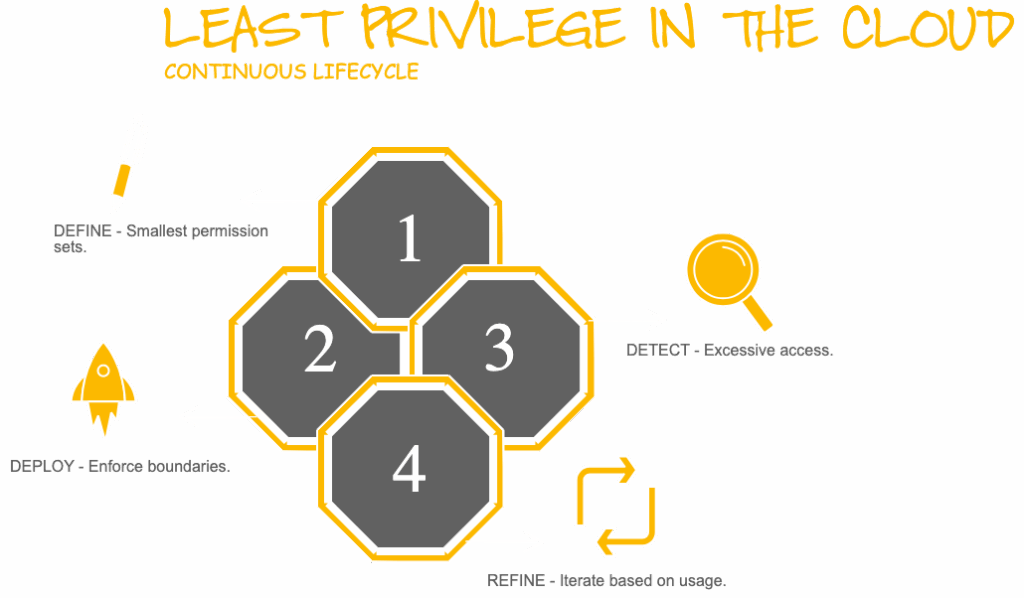
By moving from root to role, you protect not only your infrastructure but your organization’s entire cloud footprint.